The Company Details section allows you to provide essential business information required for billing, taxation, and communication. Please ensure that all details are accurate and up-to-date to avoid any issues with invoices or correspondence.
Organization Name
- Enter the official name of your company as registered.
- Ensure correct spelling and capitalization.
Billing Name
- If different from the organization name, specify the name used for invoicing.
- This name will appear on all official billing documents.
Address
- Provide the full business address, including street name and number.
- This address is used for correspondence and invoice details.
City
- Enter the city where your business is located.
- Ensure it matches official business registration details.
Postal Code
- Enter the correct postal or ZIP code for your business address.
- This ensures accurate billing and correspondence.
VAT Number (if applicable)
- Provide your company’s Value Added Tax (VAT) number.
- This is required for tax compliance and international invoicing.
- Ensure the VAT number is formatted correctly according to your country’s standards.
Website
- Enter your company’s official website URL.
- Format: https://yourcompany.com
Phone Number
- Provide a valid business contact number, including country code.
- Example: +1 234 567 890
To add or update your company details follow these steps:
- Once you login at the portal click on you profile picture located at the top right side of the screen.
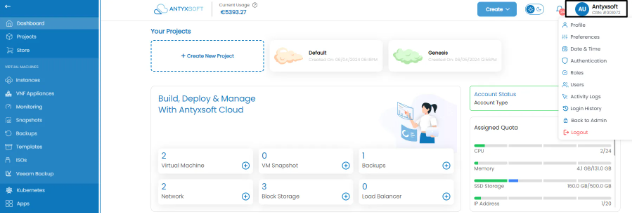
- Click "Company Details" and you will be directed at the Company Details page.
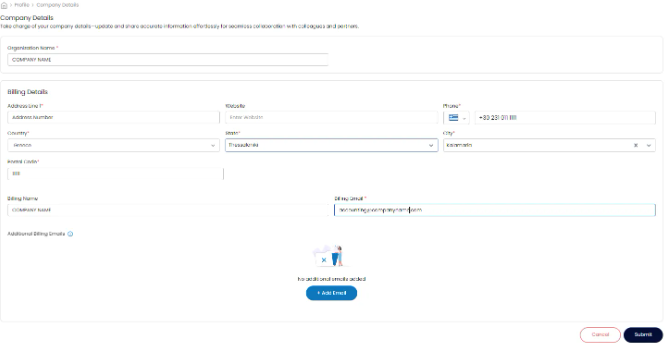
- To edit click the pencil button located at the top right of each section.

- Once you make your changes click Submit to confirm or Cancel to cancel them.
- Ensure all details match your legal business registration.
- Review the information before submitting to avoid errors in invoices.
- If updates are needed, modify your details in the account settings.
For further assistance, please contact our support team.