What is a Compute Instance?
A Compute Instance is a virtual server in the cloud that you can use just like a physical computer. It has its own CPU, memory, and storage, and you can install software, run applications, or host websites on it. With a Compute Instance, you have full control over your server environment, which makes it flexible for different types of tasks. It’s a core part of using cloud services, as it allows you to quickly launch and scale servers based on your needs.
Cloud Server - CS1
Specs: CPU: 1 RAM: 2GB Storage: 40GB Recommended Use Cases: This entry-level VPS configuration is perfect for lightweight workloads and developers or small business owners seeking a reliable, low-cost hosting solution. Despite its modest resources, it offers solid performance for a variety of use cases. Perfect for:
- Personal websites and blogs: Host a static or dynamic website using WordPress, Ghost, Hugo, or Jekyll.
- Landing pages or portfolio sites: Quick load times and low maintenance make it ideal for personal branding.
- Development and testing environments: Spin up a Linux-based sandbox for code testing, CI/CD pipelines, or learning server administration.
- Private VPN server: Set up OpenVPN or WireGuard for encrypted internet access wherever you are.
- Docker-based services: Run lightweight Docker containers such as Nginx, Whoogle, Pi-hole, or simple Flask/Node.js apps.
Who is it for? Ideal for individuals, students, and developers who need a simple, secure, and cost-effective virtual server for hosting smaller projects or for honing their server management skills.
Cloud Server - CS2
Specs: CPU: 2 RAM: 4GB Storage: 60GB
Recommended Use Cases: This mid-tier VPS offers a balanced combination of processing power, memory, and storage—suitable for users who have outgrown basic hosting and need more flexibility and performance. It's an excellent choice for hosting web applications, small business sites, and development tools.
Ideal for:
- Small to medium websites & online stores: Handle moderate traffic with CMS platforms like WordPress + WooCommerce, Joomla, or Drupal.
- Web application hosting: Host full-stack apps using Django, Laravel, Express.js, or Rails.
- Docker-based microservices: Run multiple containerized services such as databases, reverse proxies, and frontend/backend components.
- Private Git servers or DevOps tools: Self-host Gitea, Jenkins, or GitLab CE for team collaboration.
- Self-hosted services: Deploy Nextcloud, FileBrowser, or Bitwarden for secure personal cloud solutions.
Who is it for?
This VPS is perfect for freelancers, early-stage startups, and growing businesses that need reliable infrastructure without overcommitting on resources. It's also a great option for hobbyists who want to expand their self-hosting ecosystem.
Cloud Server - CS3
Specs: CPU: 3 Memory: 6GB Storage: 80GB
Recommended Use Cases: This advanced VPS plan strikes a strong balance between performance and affordability, making it suitable for heavier workloads, dynamic web applications, and small team environments. It offers the resources needed to scale beyond basic hosting, with enough headroom for multitasking and moderate user loads.
Great for:
- Busy websites and e-commerce platforms: Handle higher traffic and more concurrent users using WordPress + WooCommerce, Magento, or PrestaShop.
- SaaS projects and custom apps: Run multi-user platforms with frameworks like Laravel, Node.js, Flask, or FastAPI.
- Collaborative DevOps environments: Host CI/CD pipelines using Jenkins, GitLab Runner, or Drone CI.
- Self-hosted office & productivity tools: Deploy Nextcloud with Collabora, OnlyOffice.
- Database hosting: Serve PostgreSQL, MySQL, or MongoDB for applications with moderate read/write loads.
- API backends & microservices: Use the extra vCPU and RAM to run multiple services and APIs behind an Nginx/Traefik reverse proxy.
Who is it for? Ideal for developers, tech-savvy entrepreneurs, or small teams building and maintaining web-based products and services. It’s also an excellent platform for hosting a multi-functional private cloud setup.
Cloud Server - CS4
Specs: CPU: 4 RAM: 8GB Storage: 120GB
Recommended Use Cases: This high-performance VPS is designed to support resource-intensive applications, multi-user environments, and production-level deployments. With 4 virtual cores and 8 GB of RAM, it offers ample computing power for advanced web hosting, development pipelines, and private cloud solutions.
Perfect for:
- High-traffic websites and CMSs: Run fast and reliably with WordPress, Magento, or Joomla, even under peak loads.
- Advanced web applications: Ideal for hosting robust apps with large user bases using Django, Laravel, MEVN/MEAN stacks, or Ruby on Rails.
- Hosting multiple services: Run several Docker containers or virtual hosts for different clients or projects on the same server.
- Database servers: Suitable for medium-scale databases like PostgreSQL, MySQL, or MongoDB with active querying and replication.
- Private cloud and groupware: Run services like Nextcloud with full-text search, Collabora/OnlyOffice, and integrated email or calendar systems.
- Virtual desktop infrastructure (VDI): Host lightweight remote desktop environments or containers with GUI apps.
- Software development and CI/CD: Great for managing GitLab CE, Jenkins, or full DevOps pipelines with test runners and automation tools.
Who is it for? Perfect for tech professionals, SaaS developers, agencies, and teams managing multiple production-ready services. This VPS provides a stable foundation for serious online projects, with enough capacity to grow alongside your business.
Cloud Server - CS5
Specs: CPU: 6 RAM: 16GB Storage: 160GB
Recommended Use Cases: This VPS tier is built for high-demand, mission-critical applications that require consistent performance, scalability, and reliability. With 6 vCores and 16 GB of RAM, it’s capable of running production-grade environments, real-time services, and enterprise-level hosting.
Best suited for:
- Large-scale websites and web apps: Serve thousands of users concurrently with platforms like WordPress (with aggressive caching), Drupal, or custom SPAs.
- Multi-project hosting environments: Manage multiple clients or microservices with dedicated Docker or LXC containers.
- Database servers with high I/O: Run PostgreSQL, MySQL/MariaDB, or NoSQL solutions like MongoDB and Redis with replication or backup features.
- SaaS platforms and business tools: Support internal platforms or customer-facing services like CRMs, ERP systems (e.g., ERPNext), or analytics dashboards.
- Private cloud environments: Host an all-in-one cloud stack using Nextcloud + Collabora, secure email servers, VPNs, and groupware.
- Video streaming or media hosting: Transcode and stream content with platforms like Jellyfin or Peertube.
- DevOps & CI/CD infrastructure: Run GitLab CE, Jenkins, Nexus, Harbor, and monitoring tools without performance bottlenecks.
Who is it for? Tailored for professionals, DevOps teams, and growing businesses with production-ready applications, this VPS provides enough resources to scale, isolate services, and maintain high availability across multiple workloads.
Cloud Server - CS6
Specs: CPU: 8 RAM: 32GB Storage: 200GB
Recommended Use Cases: The Cloud Server 6 is a high-capacity virtual server designed for businesses and developers that require robust infrastructure for resource-heavy applications, multi-service architectures, or intensive back-end operations. With 8 virtual cores and 32 GB of RAM, it provides exceptional performance, stability, and scalability.
Best for:
- Enterprise applications: Run full-featured platforms such as ERP systems (Odoo, ERPNext), CRM tools, inventory management, or business analytics dashboards.
- Hosting multiple production environments: Isolate staging, QA, and production environments on a single server using Docker, LXC, or virtual machines.
- Heavy database workloads: Perfect for hosting large PostgreSQL, MySQL, or MongoDB databases with high query throughput, replication, and backups.
- Custom SaaS platforms at scale: Power customer-facing platforms with thousands of users and real-time backend activity.
- AI/ML workloads (CPU-bound): Train small to medium-sized ML models or serve AI-powered APIs using frameworks like FastAPI, Flask, or TensorFlow Lite.
- Live media streaming and transcoding: Deploy video hosting services such as Jellyfin, Peertube, or ownCloud with media previews and high-resolution support.
- Private infrastructure services: Run a private Kubernetes cluster, internal monitoring systems, GitOps tools, and distributed backup services.
Who is it for? Perfect for established companies, dev agencies, and experienced sysadmins managing infrastructure for production environments. CS6 provides a strong foundation for running mission-critical systems and scaling them without needing immediate migration to bare-metal or cloud-native solutions.
Cloud Server - CS7
Specs: CPU: 16 RAM: 64GB Storage: 320GB
Recommended Use Cases: CS 7 is designed for businesses and professionals running enterprise-grade applications, infrastructure-as-a-service environments, or large-scale deployments. With 16 CPU cores and 64 GB of RAM, it delivers datacenter-level performance suitable for hosting complex systems, high-traffic applications, and critical workloads that demand maximum uptime and throughput.
Best suited for:
- High-traffic enterprise platforms: Host applications with tens of thousands of daily users, including full-scale SaaS offerings, CRMs, and e-commerce systems.
- Database clusters and replicas: Ideal for large PostgreSQL, MySQL, and distributed NoSQL systems like Cassandra or Elasticsearch.
- Private cloud infrastructure: Run OpenStack, Proxmox, or a full Kubernetes cluster with multiple namespaces and services.
- Video platforms and content delivery: Deploy scalable platforms like Peertube, Owncast, or Jellyfin with live streaming and media libraries.
- AI/ML inference (CPU-based): Serve transformer models, real-time analytics, or run batch ML jobs with substantial memory requirements.
- Multi-tenant hosting environments: Perfect for managed hosting providers, agencies, or internal IT departments that serve multiple clients.
- GitOps & CI/CD at scale: Host GitLab Enterprise, full CI runners, Nexus/Harbor registries, and infrastructure-as-code pipelines with Terraform or Ansible.
Who is it for? Tailored for enterprises, infrastructure architects, and advanced DevOps teams who need uncompromising performance, scalability, and control. Whether you're managing infrastructure for hundreds of users or orchestrating complex systems, this VPS delivers the horsepower needed to run it all smoothly.
Creating a Compute Instance
To create an Instance through Antyxsoft Cloud Platform follow these steps:
- Login to the Portal.
- From the side panel click on Instances.
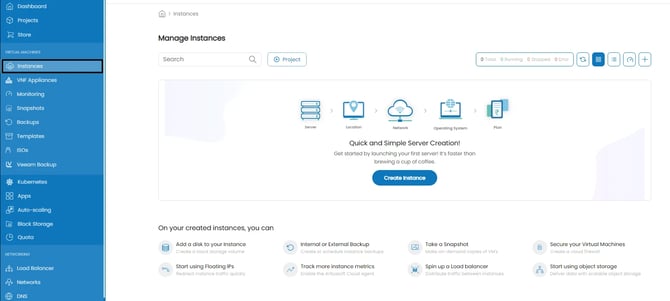
- Click on the plus (+) button located on the right you will be presented with the Compute Instance creation menu.
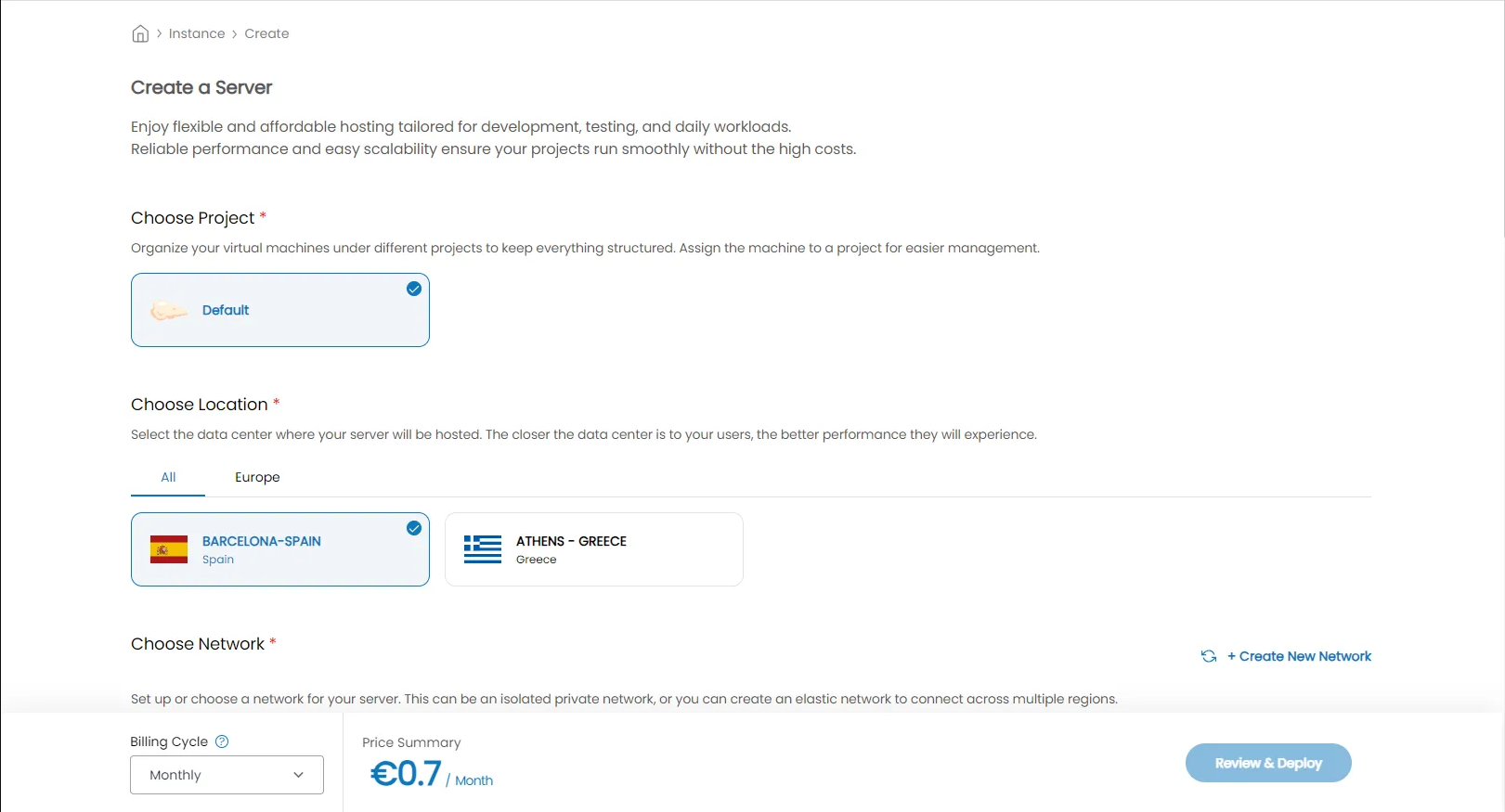
- First chose the Project you want the Instance to be created at.
- Then you'll have to select the datacenter location where the Instance will be created.
- Moving forward, you will have to choose the network the Instance will be at. For more information about the available network options visit the respected guides.
- Next, choose whether you want your server to have a public IPv4 address. This allows external access to the Instance over the internet.
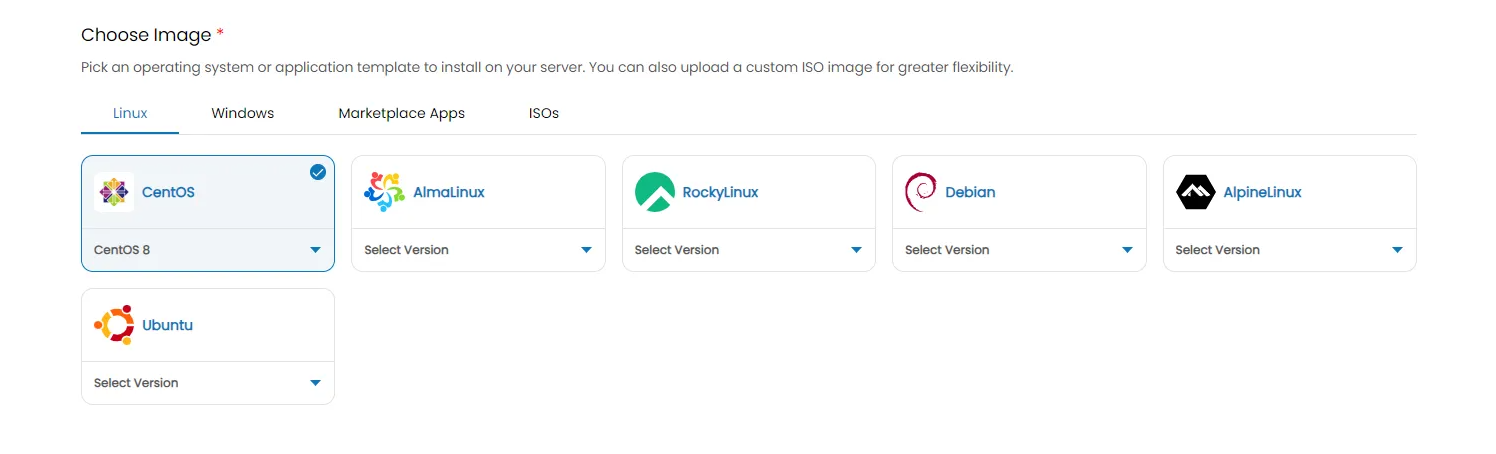
- Then you will have to select the operating system of your Instance. You can also select from the available Marketplace Apps Antyxsoft Cloud Platform provides or from an uploaded ISO that you provided.
- Next you have the option to select the CPU Type.
- Choose the Compute Instance plan. You can select from the predifined ones or set a custom plan yourself.
- Optionally you can add your SSH key or add a Startup Script to your Instance .
- Next, give your Instance a unique name and a valid hostname.
- Finally choose the Billing Cycle and then click on Review & Deploy.
After the Compute Instance has been created and fully initialized, you can begin configuring it to meet your requirements and start utilizing it.
Next steps
Now from the Instance Overview menu you can find more options to customize and manage your VM. Refer to these guide for more details: