Sophos XG Firewall template is provided as a Bring Your Own License (BYOL) image. Users must supply and activate their own valid Sophos license to enable full firewall functionality, security services, updates, and support. Licensing and subscription management are handled directly through Sophos.
Getting Started with Sophos XG Firewall Deployment
Step 1: Log in to the Portal
Log in to portal.antyxsoft.io and start the instance creation process.
Step 2: Select the Template
During the instance creation process, navigate to the Select Template section and click on the Market Place App tab.
Step 3: Choose the Sophos XG Firewall Template
From the list of available templates, select Sophos XG Firewall.
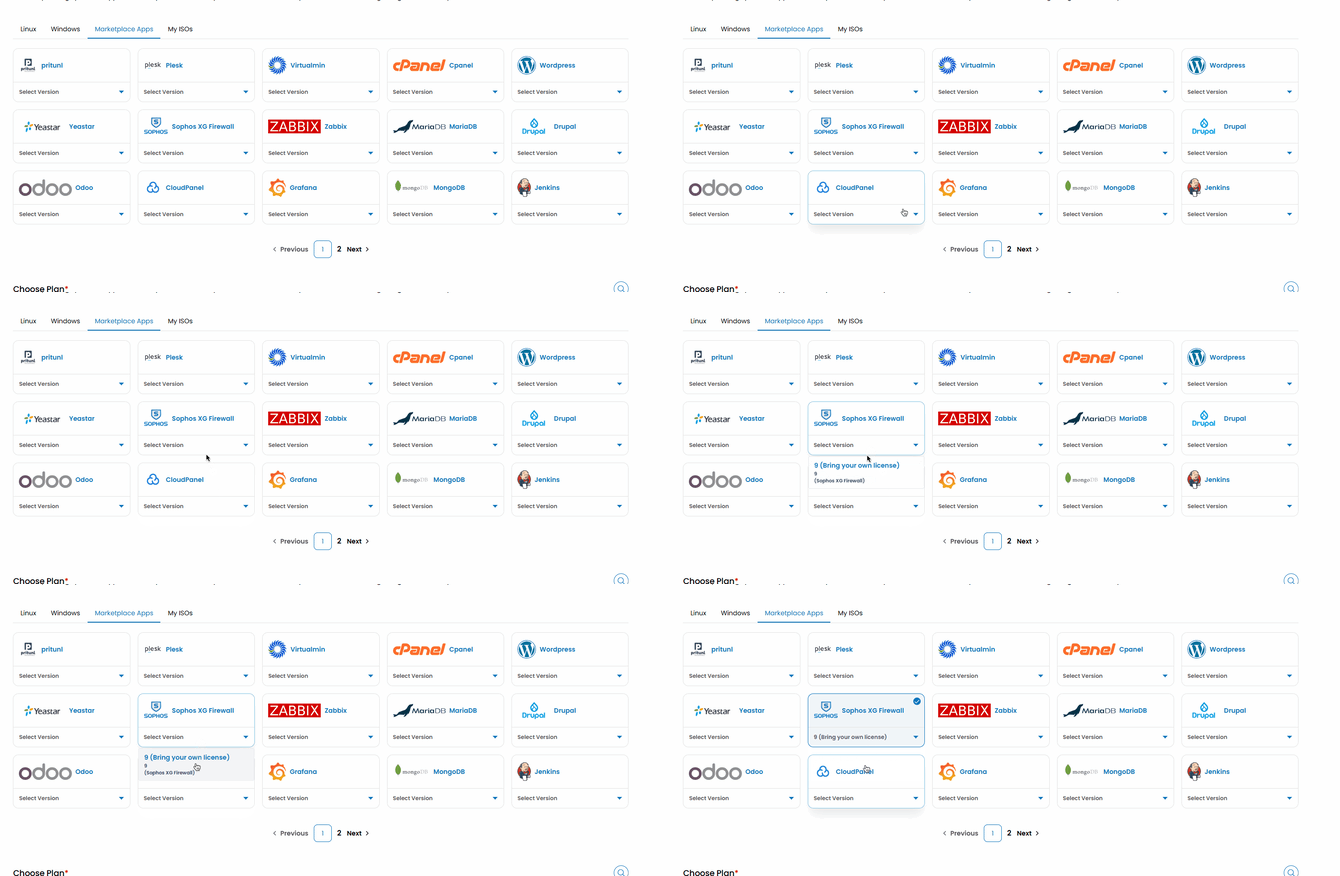
Step 4: Deploy the Instance
Proceed with the deployment by configuring the required resources, such as:
- CPU and memory
- Network interfaces
- Storage options
Then launch the instance.
Step 5: Initial Access and Licensing
Once the deployment is complete, access the Sophos XG Firewall management interface via the assigned IP address to complete the initial setup, including:
- Setting administrator credentials
- Configuring network interfaces and zones
- Uploading and activating your Sophos XG Firewall license
- Applying basic firewall and security policies
Your Sophos XG Firewall instance is now deployed and ready for use. After license activation, you can take full advantage of Sophos XG features, including advanced threat protection, application visibility, and enterprise-grade network security.